Plug in. Walk away.
Backup, uploads and invoicing for every card. Your footage is backed up, uploaded and invoiced while you get on with your day. Every shooter's cards land in your folders, the same way, and you see who shot what.
Mac and Windows. Free during beta. You'll need the key from your invite.

How it works
Everything after the shoot, done for you.
Put a card in. LyteLoad does the rest, the same careful way every time.
Back up
Checks there's room on your drive, copies every file, checks each one against the card and files it by client and shoot. It never deletes anything.
Upload
Sends it to Dropbox or Google Drive, checks every file, and sends an email when it's ready.
Invoice
Every backup becomes an invoice at your rate. Works with QuickBooks, Xero and Zoho Invoice, or makes a PDF.
Know when a card is safe to format.
- Backed up and uploaded, or it tells you what's left.
- See every shoot and what still needs uploading or billing. Clear the ones you won't.
- Get a notification on your phone when it's done, or if a drive runs out of space.

Get paid without the paperwork.
- Hourly, half day, day or flat rates.
- One invoice per shoot, or weekly and monthly.
- Always a draft. Nothing is sent until you send it.

Who it's for
Built for the people who shoot, and the people who hire them.
Pick which one you are the first time LyteLoad opens. You can be both.
Your shoots, handled.
- Reads your calendar
- Each card goes to the right client and shoot folder. No new booking system.
- Uses your drives
- Your backup drive, plus a second copy if you keep one. Swap drives whenever you like and see the free space before every backup. Files land as normal files for Lightroom, Premiere or Resolve.
- Bills the companies you shoot for
- Back up a shoot and the invoice is made for you.
- Phone app
- Get a notification when a card is safe to format, an upload finishes or something needs you. Every notification is kept on your phone and computer.
Every shooter, one workflow.
- One installer for your crew
- Send shooters an installer with your folders and uploads already set. They plug in and it's in your folder.
- Team page
- See who shot what, which cards are safe to format, and what's uploaded.
- Shooter pay
- Each shooter's invoice is made from their backup.
Plans
Everything is free during beta.
Use every plan while we test. We'll let you know well before anything changes.
Backup
For anyone with a card reader
- Verified backup
- Folders by client and shoot
- Second backup drive
- Free space check before every backup
- Calendar matching
Pro
For working shooters
- Everything in Backup
- Dropbox and Google Drive uploads
- Email updates
- Invoices
- Phone app
Team
For production companies
- Everything in Pro
- Shooter installer
- Team page
- Shooter pay
Download the beta
Checking for the latest version…
LyteLoad installs on the Mac or PC your card reader plugs into. The phone app comes with it. Send yourself this link, then open it on your computer.
Before you start
- Your beta key from your invite email
- The Mac or PC your card reader plugs into
- About 2 minutes
One security warning is normal. Macs and PCs warn about new apps that aren't registered with Apple or Microsoft yet. The steps below show exactly what to click.
See Install StepsInstall
Download LyteLoad
Enter your beta key above and click Download.
Open the LyteLoad folder
Open your Downloads folder. Safari unzips it for you. In Chrome, double-click the zip first. Open the LyteLoad folder and double-click Install on Mac.
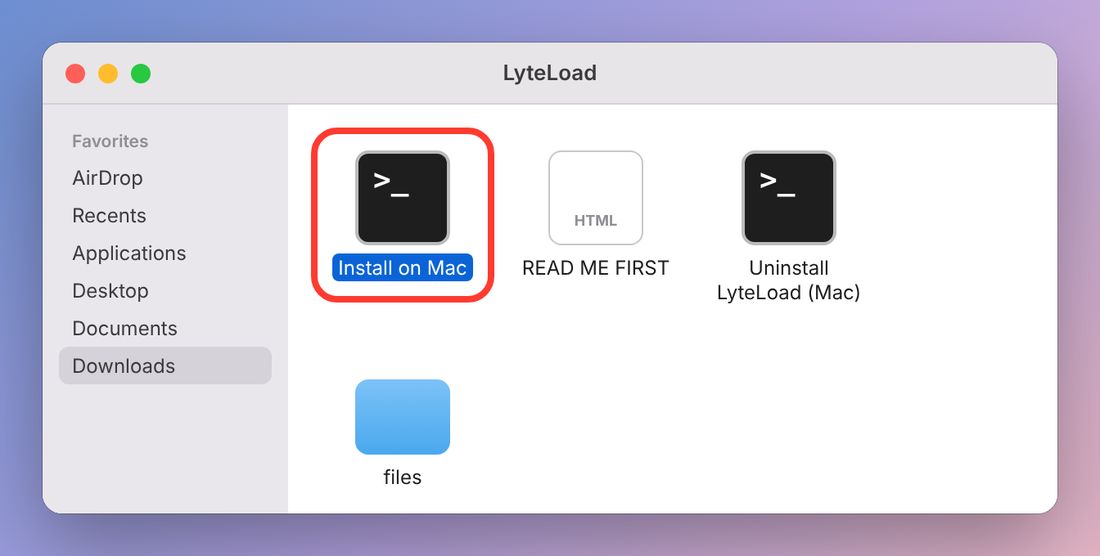
Your Mac blocks it the first time. Click Done.
This is expected. Click Done, not Move to Trash.
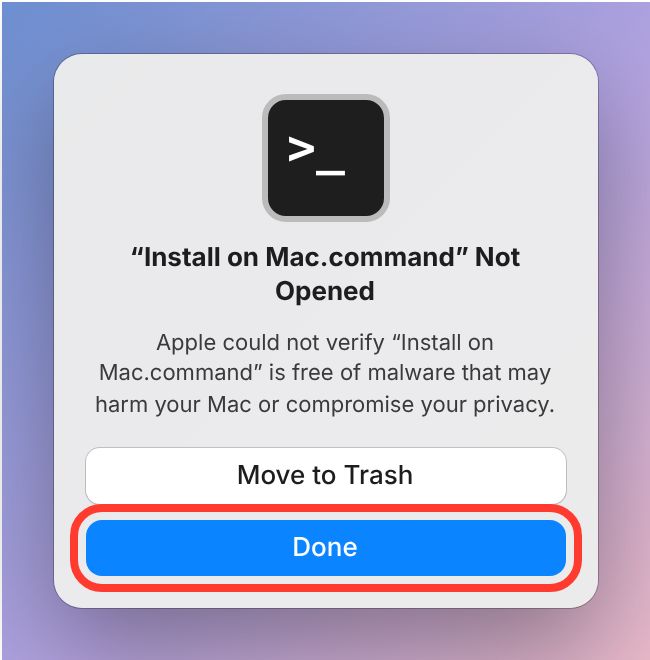
Open System Settings, then Privacy & Security
Click the Apple menu, then System Settings, then Privacy & Security. Scroll down to Security and click Open Anyway next to "Install on Mac.command was blocked".
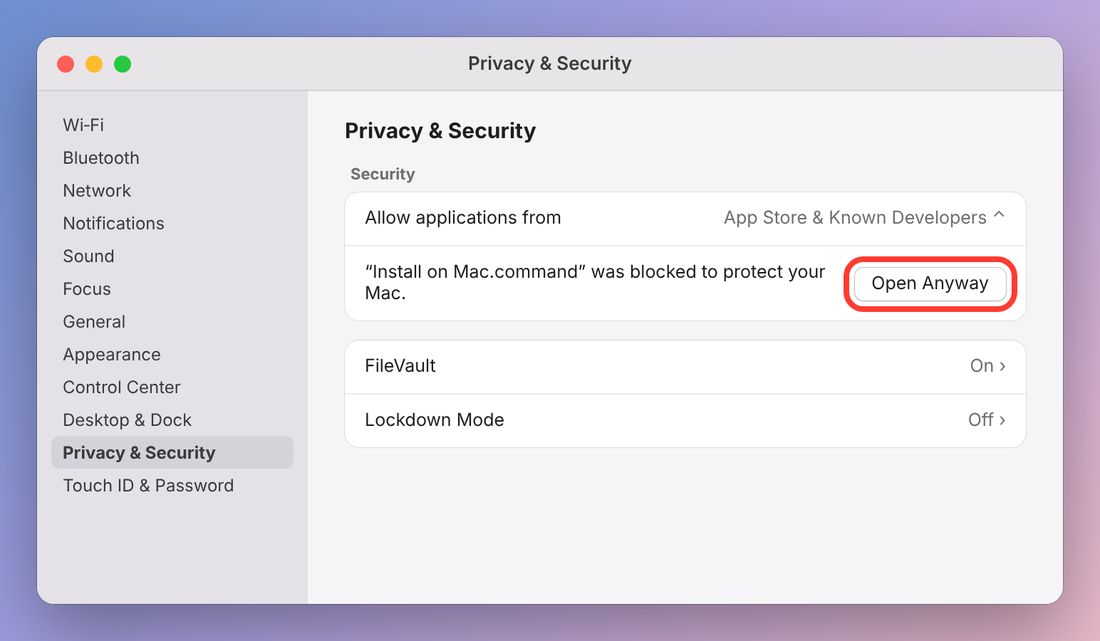
Click Open Anyway again
Your Mac asks once more. Click Open Anyway. If it asks for your Mac password or Touch ID, that's your Mac confirming you trust the app.
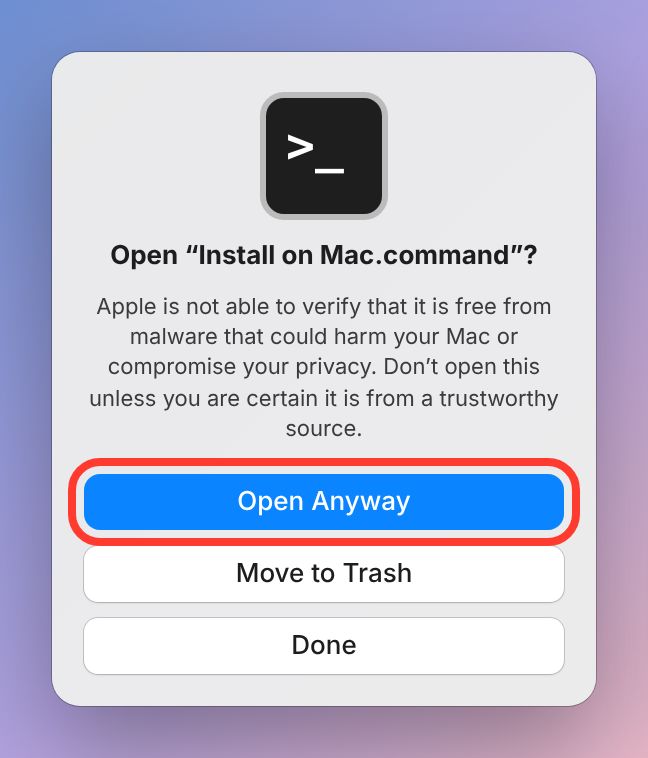
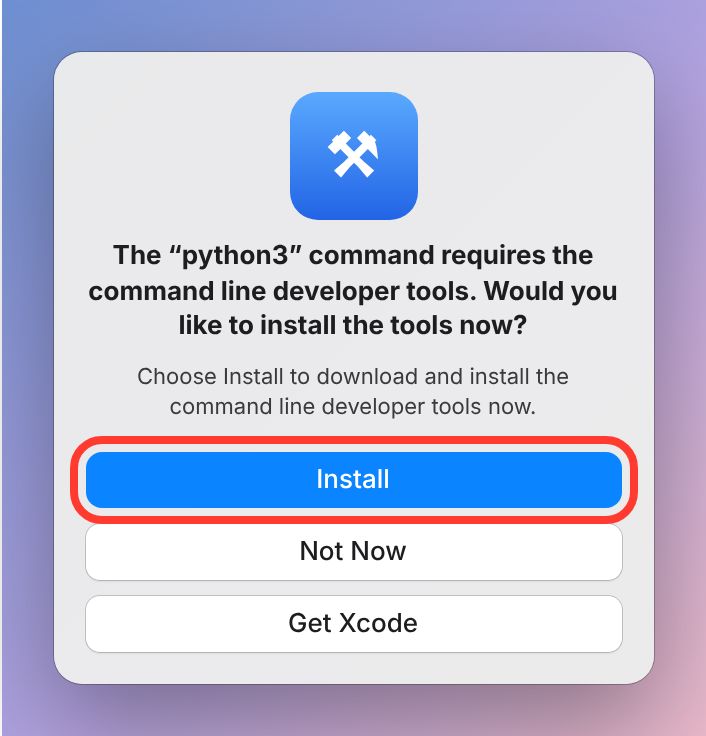
If you see "command line developer tools", click Install
Some Macs need Apple's free tools first. Click Install, agree, and wait for it to finish (5 to 15 minutes). Then double-click Install on Mac again. If this doesn't appear, skip this step.
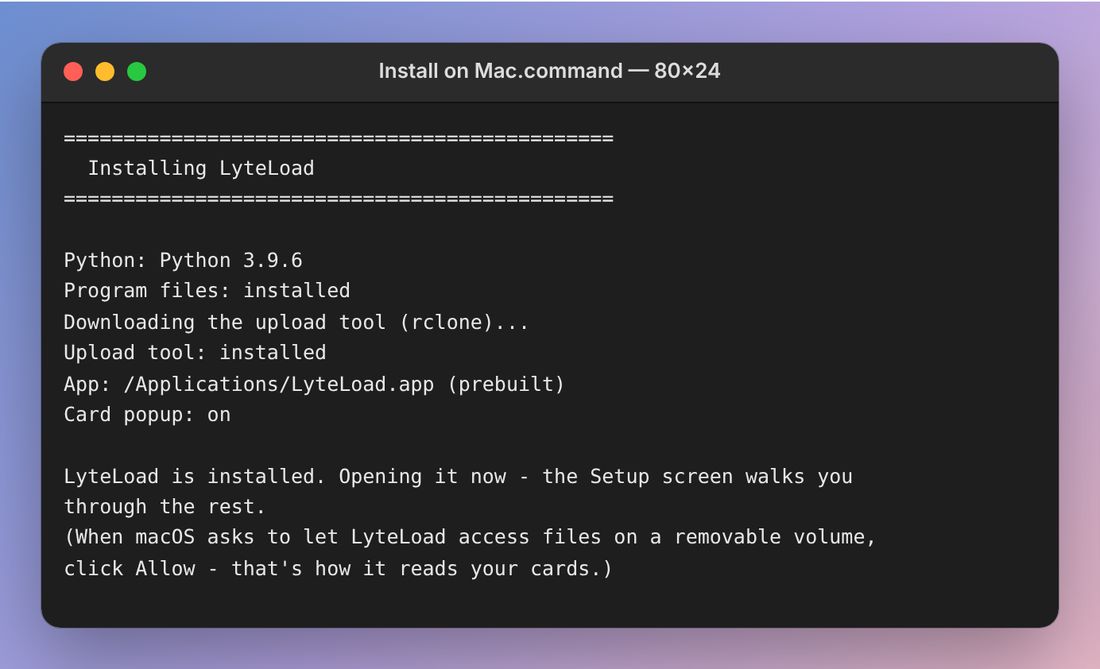
Let it install
A Terminal window shows the install. It takes about a minute, then LyteLoad opens by itself. You can close Terminal afterward.
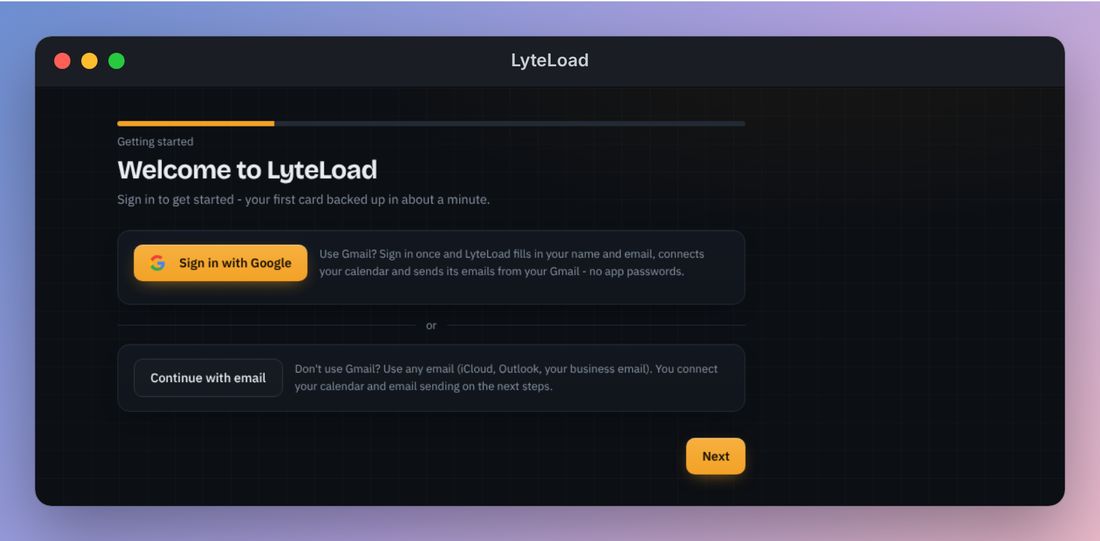
Follow LyteLoad's setup
Sign in with Google if you use Gmail, or continue with email, then follow the screens. When it asks for your key, paste your beta key.
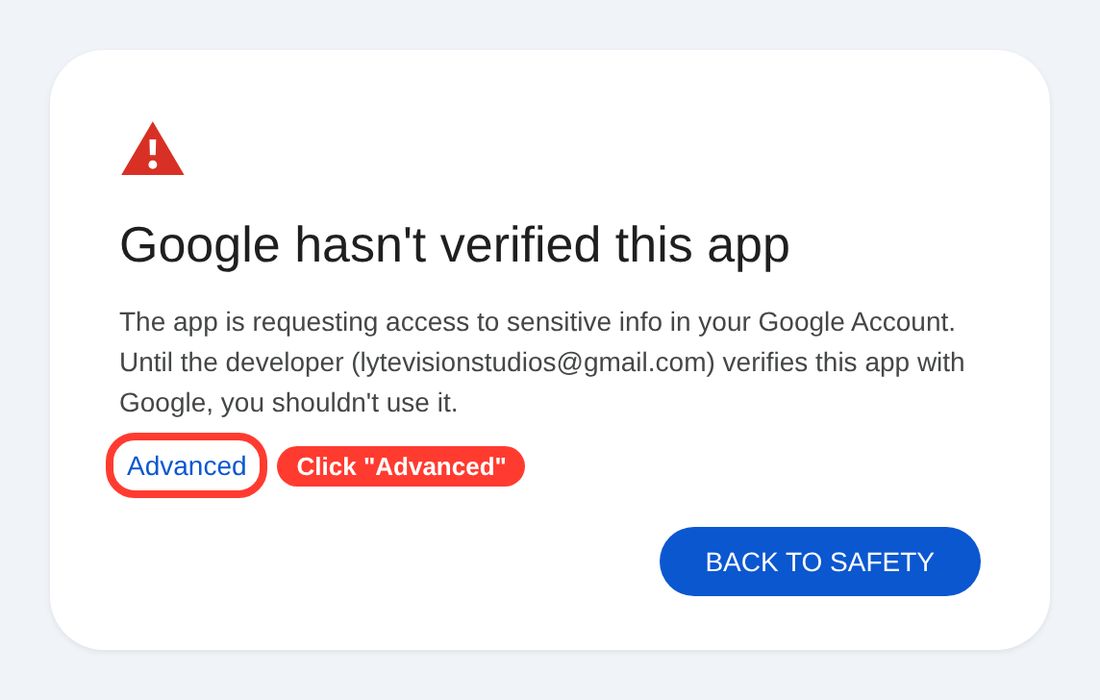
If Google says it hasn't verified LyteLoad
If you chose Sign in with Google, Google shows a warning because LyteLoad is new. Click Advanced, then Go to LyteLoad (unsafe).
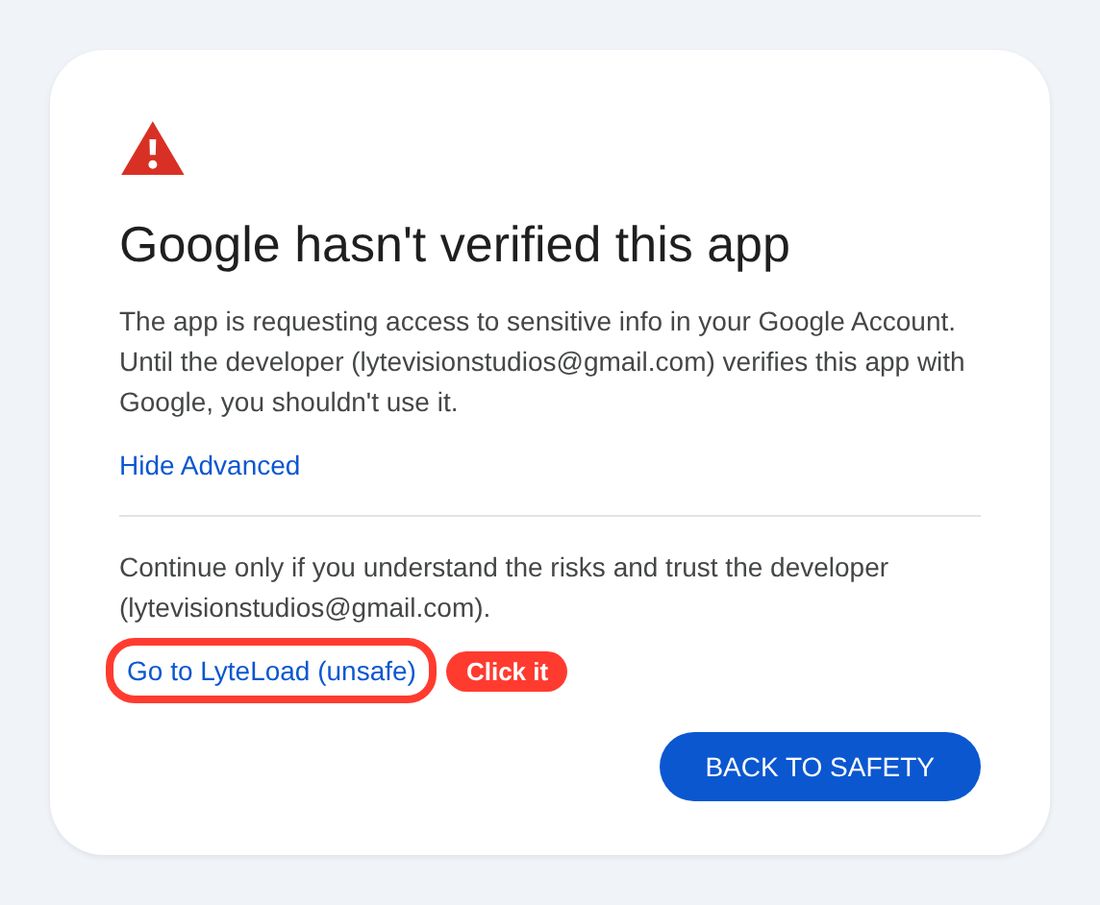
On the next screen, tick Select all and click Continue. LyteLoad needs these to read your calendar and send your emails.
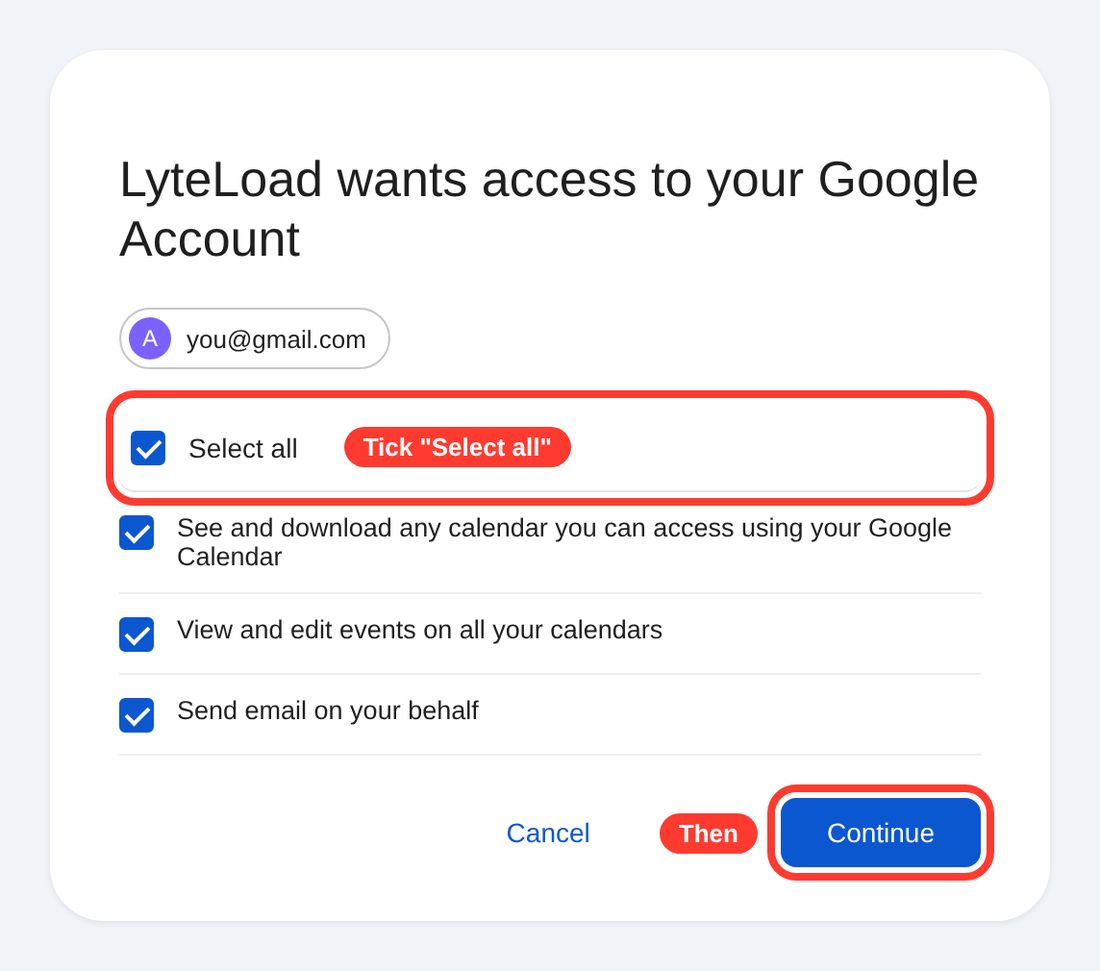
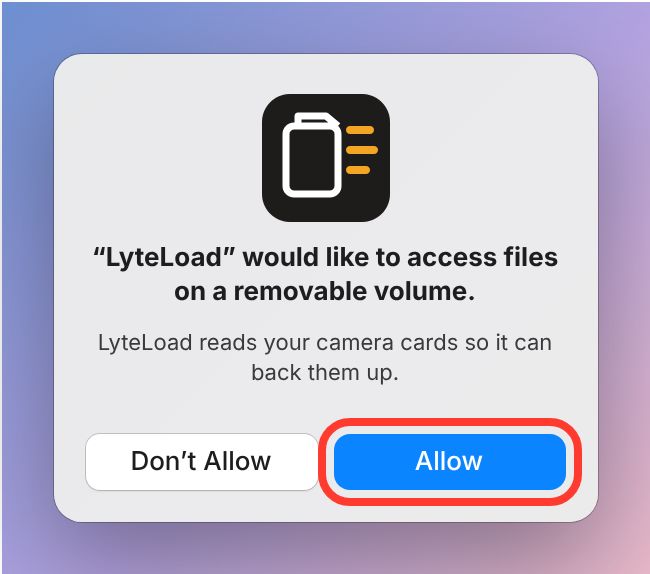
The first time you plug in a card, click Allow
Your Mac asks to let LyteLoad read files on a removable volume. Click Allow. That's how it reads your cards.
If something goes wrong
| There's no Open Anyway button | Double-click Install on Mac once more, then look in Privacy & Security again. The button shows for about an hour after the block. |
| I clicked Move to Trash | Download LyteLoad again and start over. |
| LyteLoad can't see my card | Apple menu, then System Settings › Privacy & Security › Files & Folders › LyteLoad, and turn on Removable Volumes. |
| Google says "Access blocked" | Email us the Google address you used, or choose Continue with email instead. |
| I want to remove LyteLoad | Double-click Uninstall LyteLoad (Mac) in the LyteLoad folder. Your settings and shoot history are kept. |
Download LyteLoad
Enter your beta key above and click Download.
Extract the zip
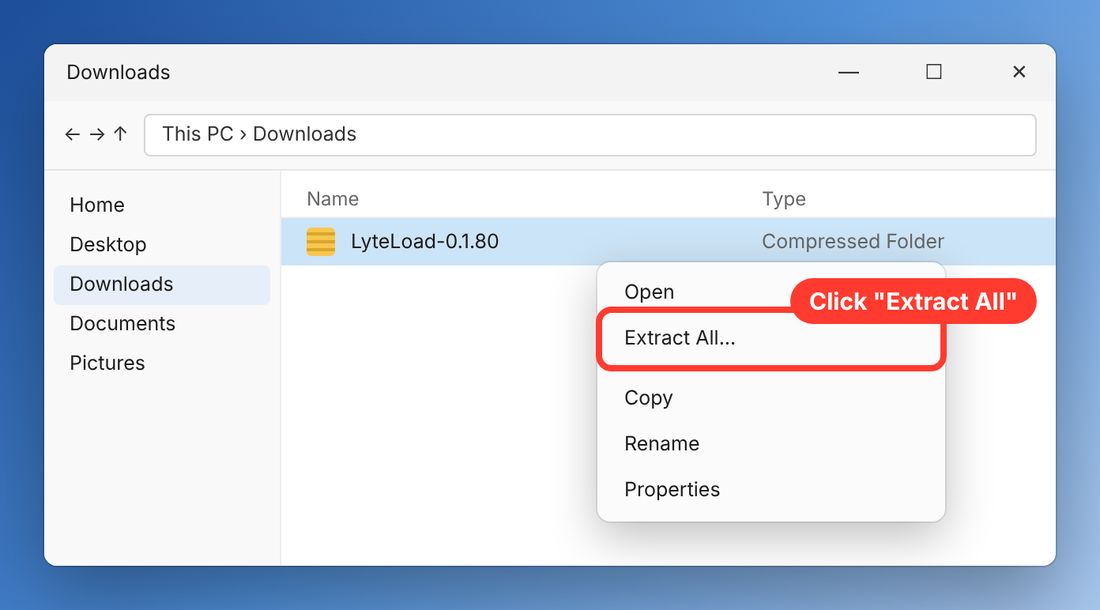
Open your Downloads folder, right-click the LyteLoad zip and choose Extract All, then Extract. Don't run it from inside the zip.
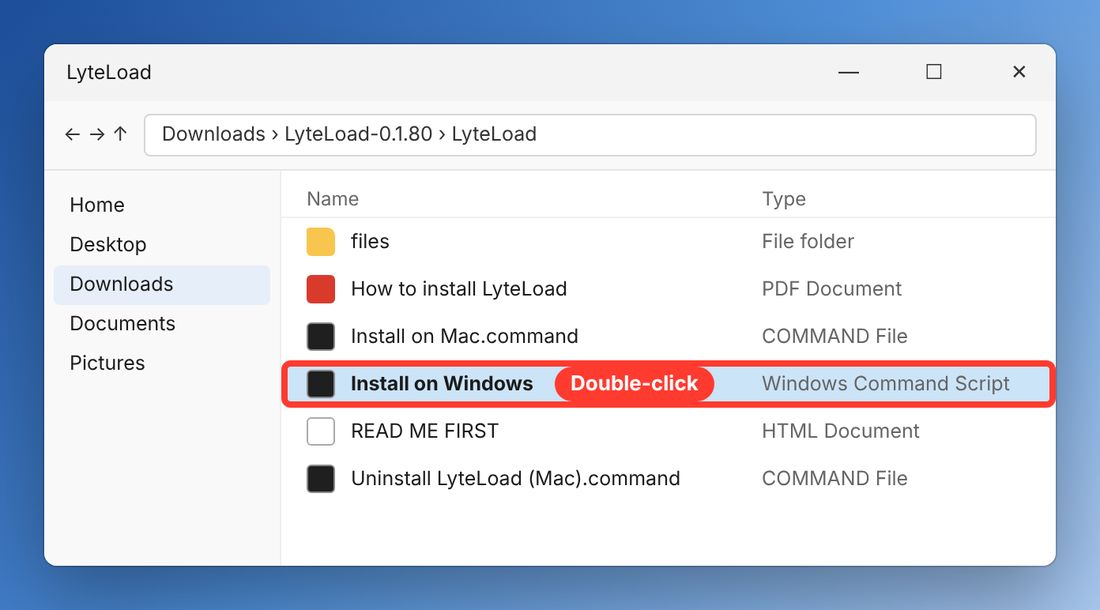
Double-click Install on Windows
Open the LyteLoad folder and double-click Install on Windows.
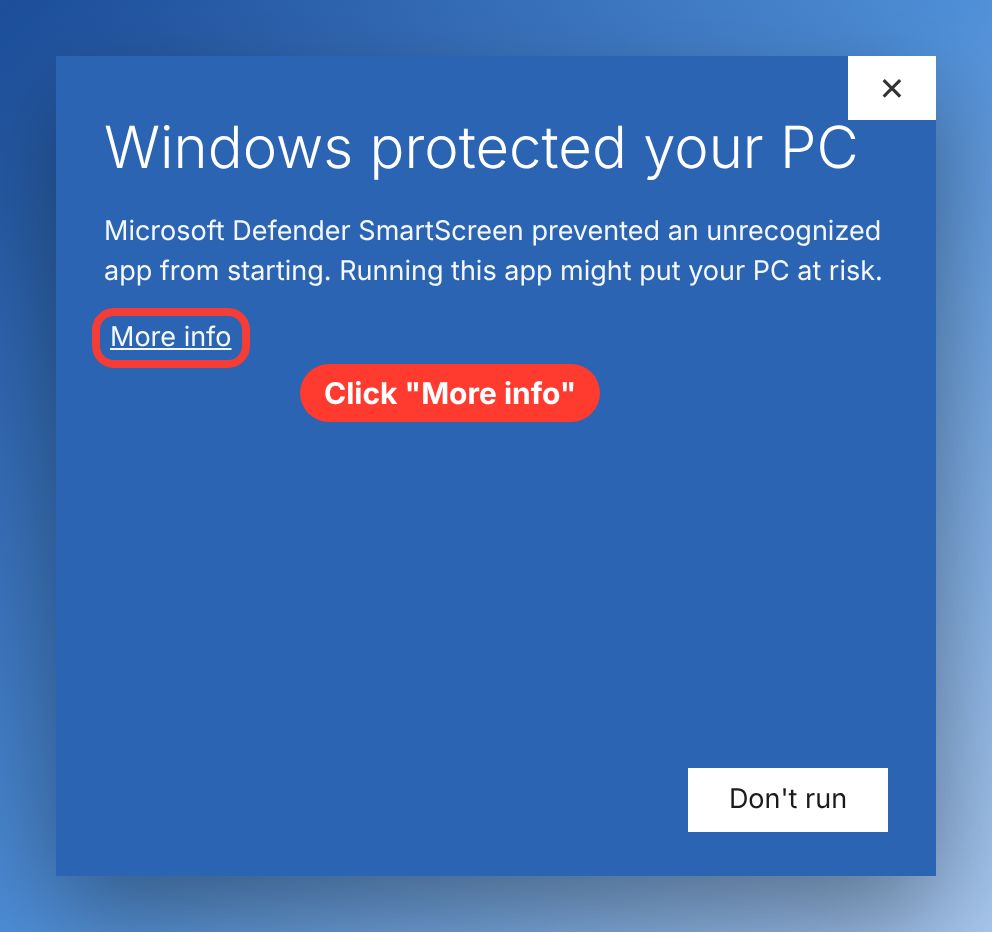
Windows protected your PC. Click More info.
This shows the first time. Click the small More info link. Don't click Don't run.
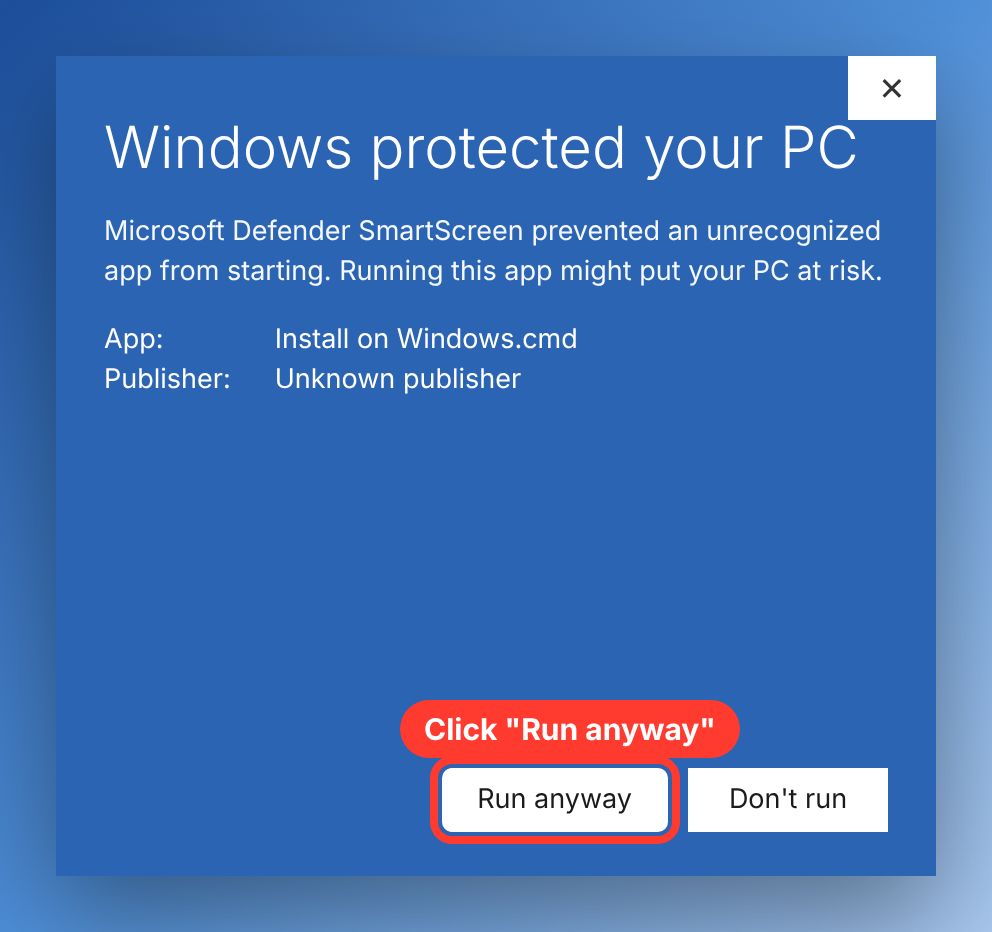
Click Run anyway
A Run anyway button appears at the bottom. Click it.
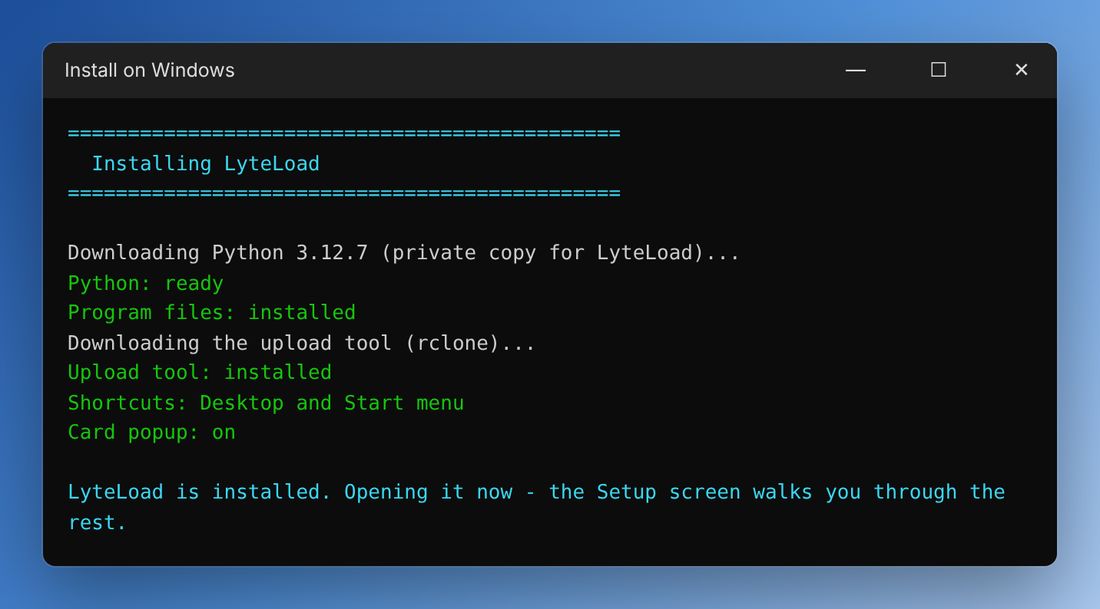
Let it install
A window shows the install. It takes about a minute, then LyteLoad opens by itself. No admin password is needed and nothing else on your computer is changed.
Follow LyteLoad's setup
Sign in with Google if you use Gmail, or continue with email, then follow the screens. When it asks for your key, paste your beta key.
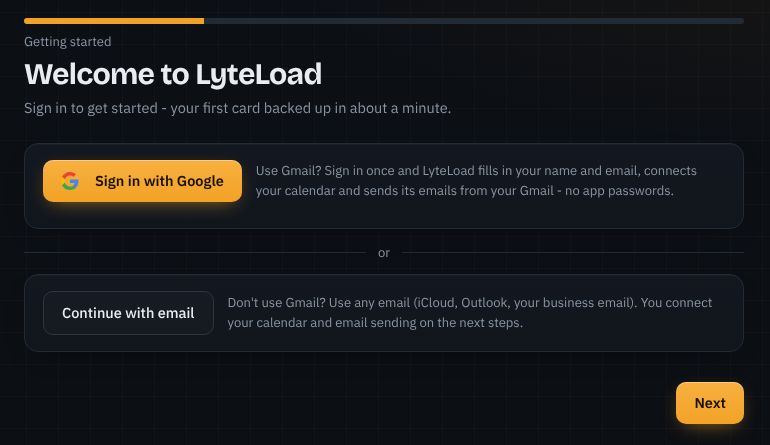
If Google says it hasn't verified LyteLoad
If you chose Sign in with Google, Google shows a warning because LyteLoad is new. Click Advanced, then Go to LyteLoad (unsafe).
On the next screen, tick Select all and click Continue. LyteLoad needs these to read your calendar and send your emails.
If something goes wrong
| I clicked Don't run | Double-click Install on Windows again. |
| There's no Run anyway button | Click More info first. It only appears after that. |
| The install stopped | Check your internet connection and double-click Install on Windows again. It picks up where it stopped. |
| My antivirus blocked it | Email us which antivirus you use. Don't turn your antivirus off. |
| Google says "Access blocked" | Email us the Google address you used, or choose Continue with email instead. |
| I want to remove LyteLoad | Windows Settings › Apps › Installed apps › LyteLoad › Uninstall. Your settings and shoot history are kept. |
FAQ
Questions
Is my footage safe?
LyteLoad only adds files. It never deletes or changes anything on your cards, your drives or anyone's Dropbox or Google Drive, and it checks every copy. It's still beta, so look over your files before you format a card.
Will it work with my camera?
Almost certainly. Canon, Nikon, Sony, Fujifilm, Panasonic, GoPro, DJI, Insta360, RED, Blackmagic, ARRI and Atomos media, plus audio recorders like Zoom, Tascam, Sound Devices, Rode and DJI Mic.
Do I have to change how I work?
No. Keep your drives, folder names, editing app, cloud storage and invoicing app. LyteLoad does the steps you already do.
What if my drive fills up?
LyteLoad checks the free space before it starts and won't start a backup that doesn't fit. If the drive fills anyway, it stops, keeps every verified file and tells you not to format the card.
Is there a phone app?
Yes. LyteLoad installs on your computer, and the phone app sends you a notification when a card is safe to format, an upload finishes or a drive is full. Past notifications are kept in the app. Open it from the account menu in LyteLoad.
How do updates work?
LyteLoad checks for updates on its own. When there's a new version, you'll see it on Home. Click Install, and your settings stay put.
Where do I put my key?
Setup asks for it. You can also add or change it in Settings › Account.